Best Email Security Solutions for Small Businesses
Best Small Business Email Security Solutions
Email remains one of the most common ways attackers reach a business.
Employees receive invoices, password-reset messages, shared documents, customer requests, cloud-service notifications, and internal communications throughout the day. Attackers take advantage of that normal activity by sending phishing emails, fake payment requests, malicious attachments, impersonation messages, and links designed to steal login credentials.
For a small business, one successful email attack can lead to stolen accounts, malware infections, financial loss, ransomware, or exposure of sensitive information.
That is why email security should be treated as more than basic spam filtering.
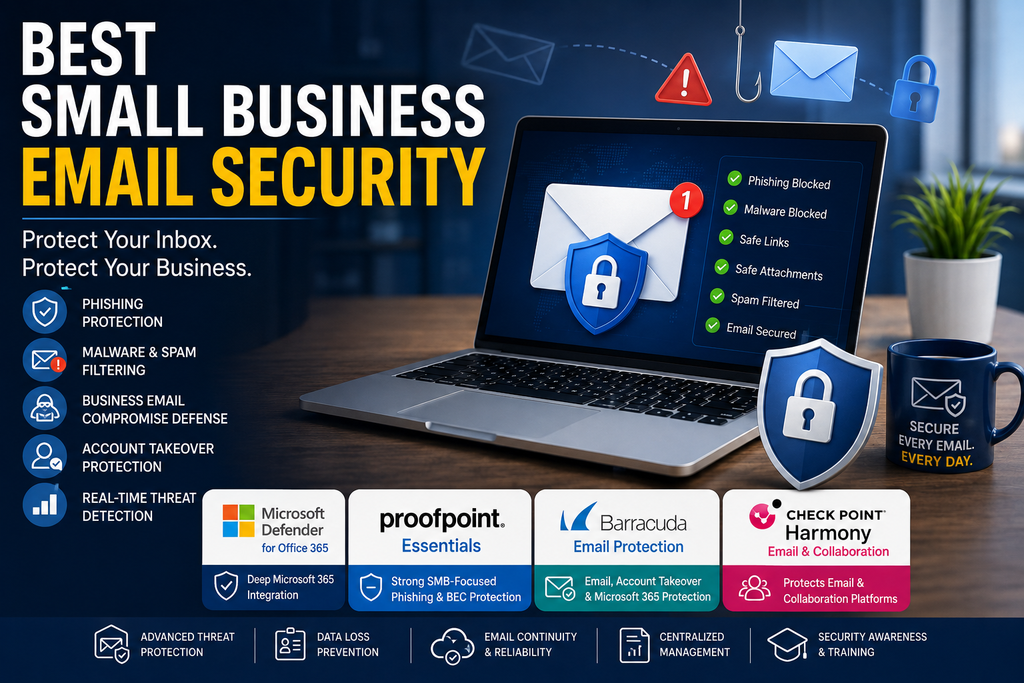
In this guide to the best small business email security solutions, we compare several practical options based on phishing protection, malware filtering, business email compromise defense, account-takeover protection, administration, integrations, and suitability for smaller teams.
Quick Comparison
| Email Security Solution | Best For | Pricing Approach | Main Strength |
|---|---|---|---|
| Microsoft Defender for Office 365 | Microsoft 365 businesses | From $2/user/month annually | Deep Microsoft 365 integration |
| Proofpoint Essentials | Small businesses wanting dedicated email protection | Per-user plans | Strong SMB-focused phishing and BEC protection |
| Barracuda Email Protection | Businesses wanting broader Microsoft 365 protection | Tiered / quote-based options | Email, account takeover, backup, and security features |
| Check Point Harmony Email & Collaboration | Businesses using email plus collaboration apps | Quote-based | Protects email and collaboration platforms together |
Pricing, packaging, and features can change. Always confirm current details directly with the provider before purchasing.
Why Small Businesses Need Email Security
Many cyberattacks begin with a message that looks normal.
An employee may receive:
- A fake Microsoft 365 login request
- A fraudulent invoice
- A message pretending to be from the owner or manager
- A malicious attachment
- A fake cloud-storage notification
- A password-reset scam
- A compromised supplier email
- A link to a fake login page
Traditional spam filters can block obvious junk, but modern email attacks are often designed to look legitimate.
Business email compromise, phishing, credential theft, and impersonation attacks may contain no malware at all.
That is why modern email security tools increasingly use behavioral analysis, link scanning, attachment analysis, identity protection, and account-takeover detection in addition to basic filtering.
1. Microsoft Defender for Office 365
Best for businesses already using Microsoft 365
Microsoft Defender for Office 365 is one of the most natural email-security choices for businesses already using Microsoft 365.
It is designed to protect Exchange Online, Microsoft Teams, SharePoint, and OneDrive against advanced threats.
Pricing
Microsoft Defender for Office 365 Plan 1 is currently listed at $2 per user per month when paid annually.
It is also included with Microsoft 365 Business Premium.
Plan 2 costs more and adds advanced hunting, automation, attack-simulation training, and broader XDR capabilities.
Protection Features
Plan 1 includes capabilities such as:
- Phishing protection
- Malware protection
- Safe Links
- Safe Attachments
- Protection against zero-day threats
- QR-code and malicious-link protection
- Internal email protection
- Real-time reporting
For small companies already using Microsoft accounts, this can reduce the number of separate systems administrators need to manage.
Safe Links
Safe Links can examine URLs and help block access to malicious destinations.
This matters because many phishing messages no longer contain malicious files. Instead, they direct users to fake login pages designed to steal credentials.
Safe Attachments
Safe Attachments helps analyze files before users open them.
This adds another layer of protection against malware and malicious documents.
What We Like
- Strong Microsoft 365 integration
- Affordable standalone Plan 1 pricing
- Included with Microsoft 365 Business Premium
- Safe Links protection
- Safe Attachments
- Phishing and malware defense
- Protection across Teams, SharePoint, and OneDrive
- Centralized Microsoft administration
Potential Drawbacks
- Best suited to Microsoft environments
- Advanced automation and simulation features require Plan 2
- Microsoft licensing can be confusing
- Businesses using Google Workspace may prefer another solution
Who Should Consider It?
Microsoft Defender for Office 365 is particularly attractive for companies already using Microsoft 365.
If your business already has Microsoft 365 Business Premium, check whether you already have access before purchasing another email-security platform.
2. Proofpoint Essentials
Best for small businesses wanting dedicated email security
Proofpoint Essentials is designed specifically for small and medium-sized businesses.
It provides email protection based on technology from Proofpoint’s broader security platform but packaged for smaller organizations.
Protection Features
Depending on the plan, Proofpoint Essentials can provide:
- Inbound and outbound email filtering
- Phishing protection
- Malware filtering
- Business email compromise protection
- URL defense
- Attachment analysis
- Data loss prevention
- Email continuity
- Encryption
- Archiving
- Security awareness capabilities
Proofpoint’s higher Essentials tiers add stronger BEC defenses and more advanced URL and attachment protection.
Business Email Compromise Protection
Business email compromise is particularly dangerous because the attacker may not send malware.
Instead, the attacker may impersonate:
- A company executive
- A supplier
- An accountant
- A customer
- A trusted employee
The message may simply ask someone to transfer money, change bank details, or send sensitive information.
Proofpoint Essentials includes BEC-focused protection on supported plans, which makes it relevant for small businesses dealing with invoices and financial communications.
Ease of Administration
Proofpoint positions Essentials as easier to manage than enterprise-level security platforms.
That matters for businesses without dedicated cybersecurity staff.
What We Like
- Designed specifically for SMBs
- Strong phishing protection
- BEC defense available
- URL and attachment protection
- Email continuity options
- Data loss prevention
- Encryption and archiving on higher plans
- Works well with Microsoft 365 environments
Potential Drawbacks
- Several plan levels can make comparison confusing
- Advanced BEC and sandboxing features require higher plans
- Pricing may depend on reseller or provider
- Small teams may not need every available feature
Who Should Consider It?
Proofpoint Essentials is a strong option for small businesses that want dedicated email security rather than relying only on the protections built into their email provider.
It is particularly worth considering when phishing and business email compromise are major concerns.
3. Barracuda Email Protection
Best for businesses wanting broader Microsoft 365 protection
Barracuda Email Protection combines email filtering with additional security features aimed at protecting Microsoft 365 environments.
Barracuda currently offers multiple plans, including Advanced, Premium, and Premium Plus.
Advanced Plan
The Advanced tier focuses primarily on stopping email threats.
Features include:
- AI-powered threat detection
- Spam protection
- Malware protection
- Phishing defense
- Business email compromise protection
- Account-takeover protection
- DMARC reporting
Premium Plan
Premium adds broader Microsoft 365 data protection.
Depending on the package, this can include protection for:
- Entra ID
- Exchange
- OneDrive
- SharePoint
- Teams
It may also include email encryption, continuity, and additional data-protection features.
Premium Plus
Premium Plus extends the platform further with capabilities such as:
- Security awareness training
- Email archiving
- eDiscovery
- Compliance tools
- Regulatory reporting
That makes it more suitable for businesses with broader security or compliance requirements.
Account Takeover Protection
Account takeover is a major email-security problem.
If attackers obtain a user’s credentials, they may send convincing messages from a real company account.
Barracuda includes account-takeover protection in its email-security offering, which can help identify suspicious account behavior.
What We Like
- Strong phishing and malware defense
- BEC protection
- Account-takeover protection
- Microsoft 365 data-protection options
- Security awareness training on higher plans
- Archiving and compliance features
- Multiple deployment options
- Good fit for businesses wanting a broader security platform
Potential Drawbacks
- Multiple product tiers can be confusing
- Higher-level features increase cost
- Some pricing requires a quote or reseller
- Very small businesses may not need the broader Microsoft 365 features
Who Should Consider It?
Barracuda is a strong candidate for businesses that want email security plus broader Microsoft 365 protection.
It may be particularly useful for companies that also care about backup, archiving, account protection, and security awareness training.
4. Check Point Harmony Email & Collaboration
Best for businesses protecting email and collaboration platforms together
Check Point Harmony Email & Collaboration is designed to protect not only email but also collaboration services.
This can be useful because employees increasingly receive links, files, and messages through platforms other than traditional email.
Supported Platforms
Depending on the selected package, Harmony can protect services such as:
- Microsoft 365 email
- Gmail
- Microsoft Teams
- Slack
- Dropbox
- OneDrive
- SharePoint
- Other supported collaboration applications
Threat Protection
Harmony includes capabilities such as:
- Phishing protection
- Account-takeover protection
- URL emulation
- Malware sandboxing
- Content disarm and reconstruction
- Protection against malicious attachments
- Internal email protection
- Optional data loss prevention
Content Disarm and Reconstruction
Content Disarm and Reconstruction, often shortened to CDR, takes a different approach to suspicious documents.
Rather than relying only on malware detection, the system can remove potentially dangerous components from files while preserving usable content.
This may provide additional protection against malicious documents that traditional scanners have not yet identified.
Email Plus Collaboration Security
One of Harmony’s biggest advantages is that it can extend protection beyond email.
Businesses increasingly communicate through Teams, Slack, file-sharing systems, and cloud collaboration platforms.
Protecting these services from malicious links and files can provide a more consistent security layer.
What We Like
- Strong phishing protection
- Account-takeover protection
- Advanced URL analysis
- Sandboxing
- CDR technology
- Protects collaboration apps as well as email
- Microsoft 365 and Gmail support
- DLP available on higher packages
Potential Drawbacks
- Pricing generally requires a quote
- May be more advanced than very small businesses need
- Configuration may require more technical expertise
- Smaller teams focused only on basic email filtering may prefer a simpler product
Who Should Consider It?
Check Point Harmony is particularly attractive for businesses that use several collaboration platforms and want one security approach across email, file sharing, and communication tools.
Which Small Business Email Security Solution Is Best?
The best solution depends heavily on which email platform your company already uses.
Choose Microsoft Defender for Office 365 If
Microsoft Defender may be the best fit if:
- Your business already uses Microsoft 365
- You have Microsoft 365 Business Premium
- You want strong phishing and attachment protection
- You prefer centralized Microsoft administration
- You need protection across Teams, SharePoint, and OneDrive
Choose Proofpoint Essentials If
Proofpoint may be the best fit if:
- You want dedicated email security
- Phishing is a major concern
- Business email compromise protection is important
- You want advanced URL and attachment scanning
- You may need continuity, encryption, or archiving
Choose Barracuda If
Barracuda may be the best fit if:
- You want email security plus Microsoft 365 protection
- Account takeover is a concern
- You need backup, continuity, or archiving
- Security awareness training is important
- You want room to grow into broader protection
Choose Check Point Harmony If
Check Point may be the best fit if:
- Your employees use multiple collaboration platforms
- You want protection across email and cloud applications
- Advanced phishing protection is important
- You need sandboxing or CDR
- Your company has more technical security requirements
What Features Should Small Businesses Look For?
When comparing small business email security tools, focus on the threats your employees are most likely to face.
Phishing Protection
The system should identify suspicious login pages, fake messages, and impersonation attempts.
Malware and Attachment Scanning
Attachments should be scanned before employees open them.
More advanced systems may use sandboxing or behavioral analysis.
Malicious Link Protection
Links should be checked for dangerous destinations.
Time-of-click scanning is particularly useful because a website can become malicious after an email has already been delivered.
Business Email Compromise Protection
Look for protection against executive impersonation, supplier fraud, fake invoices, and payment-request scams.
Account-Takeover Detection
If an employee account is compromised, the security platform should help identify unusual behavior.
Internal Email Protection
Attackers who compromise one employee may send phishing messages internally.
Protecting internal messages can reduce this risk.
Data Loss Prevention
DLP can help stop sensitive information from being sent outside the company accidentally or intentionally.
Not every small business needs advanced DLP, but it can be useful for organizations handling sensitive customer or financial information.
Email Continuity
Some providers offer temporary mailbox access if the primary email service becomes unavailable.
This can help businesses continue working during outages.
Archiving
Archiving may be important for organizations with retention or regulatory requirements.
Microsoft 365 vs Google Workspace Email Security
Both Microsoft 365 and Google Workspace provide built-in email-security features.
For many very small businesses, those protections may provide a reasonable starting point.
However, additional security may be useful when:
- Employees regularly receive external invoices
- The company handles sensitive information
- Executive impersonation is a concern
- The business has suffered phishing incidents
- Stronger attachment or URL analysis is required
- The company needs DLP or archiving
- Security staff need better reporting and remediation
The right choice depends on risk, not simply company size.
Why Business Email Compromise Matters
Business email compromise can be more difficult to detect than traditional malware.
The attacker may send a completely normal-looking message such as:
“Please update our supplier bank details.”
or:
“I need this invoice paid today.”
There may be no malware and no suspicious attachment.
The attack succeeds because the message appears to come from someone the employee trusts.
Businesses can reduce BEC risk by combining email security with:
- MFA
- Employee verification procedures
- Payment-change confirmation
- Security awareness training
- Strong password management
- Limited account permissions
Email Security and MFA Work Together
Email security should not replace multi-factor authentication.
If an employee enters credentials into a phishing page, MFA may still prevent an attacker from accessing the account.
For stronger protection, use both.
Our Best Small Business MFA Tools guide covers practical authentication options for smaller teams.
Email Security and Password Managers
Password managers can also reduce phishing risk.
A password manager may refuse to autofill credentials on a fake login domain, which can alert the user that something is wrong.
Businesses should combine email security with unique passwords and secure credential management.
See our Best Password Managers for Small Businesses guide for more options.
Common Email Security Mistakes
Relying Only on Spam Filtering
Spam filtering is useful, but modern phishing attacks may look completely legitimate.
Ignoring Internal Email
A compromised employee account can be used to attack coworkers.
Allowing Weak Authentication
Email accounts should use MFA wherever possible.
Failing to Verify Payment Changes
Changes to banking details or payment instructions should be confirmed through another trusted communication method.
Giving Too Many Users Administrative Access
Administrator accounts should be limited and protected more strongly than normal user accounts.
Never Training Employees
Technology can block many threats, but employees still need to recognize suspicious behavior.
Is Built-In Email Security Enough?
For some very small businesses, it may be.
Microsoft 365 and Google Workspace already provide important security controls.
However, a dedicated email-security platform may be worth considering if your business faces higher risk or needs more advanced protection.
This is especially true for businesses handling:
- Financial transactions
- Sensitive customer information
- Healthcare or legal information
- Large numbers of invoices
- International suppliers
- Administrator accounts
- High-value business communications
Our Recommendation
For businesses already using Microsoft 365 Business Premium, Microsoft Defender for Office 365 should be one of the first options to evaluate because it may already be included.
Proofpoint Essentials is one of the strongest dedicated SMB-focused choices for phishing and business email compromise protection.
Barracuda Email Protection is attractive for businesses that want broader Microsoft 365 protection, account-takeover defense, archiving, backup, or awareness training.
Check Point Harmony Email & Collaboration makes the most sense for organizations that want stronger protection across both email and collaboration applications.
The best option is the one that fits your current email platform, risk level, budget, and administrative capabilities.
Strengthen Your Email Security
Choosing reliable small business email security is an important step, but it should be part of a broader cybersecurity strategy.
Combine email protection with multi-factor authentication, strong password management, endpoint security, backups, employee training, and clear procedures for verifying financial requests.
For more practical guidance, visit our Cybersecurity section and our Small Business Technology Guides.
You can also read our Best Small Business MFA Tools, Best Small Business Antivirus Software, and Best Small Business Backup Solutions guides.
Email-security products, prices, plans, and features can change. Confirm current information directly with each provider before making a purchasing decision.
