1Password vs Bitwarden: Which Password Manager Actually Wins?
1Password vs Bitwarden for Small Businesses
Choosing between 1Password and Bitwarden is not simply a matter of deciding which password manager has the longest list of features. Both can help small businesses create stronger passwords, share credentials more safely, and manage access across a team. The differences become more important when you consider pricing, ease of use, administrative controls, integrations, and how much flexibility your business actually needs.
In this 1Password vs Bitwarden for small businesses comparison, we look at the practical differences between the two services and where each one is likely to make the most sense.
Quick Comparison
| Factor | 1Password | Bitwarden |
|---|---|---|
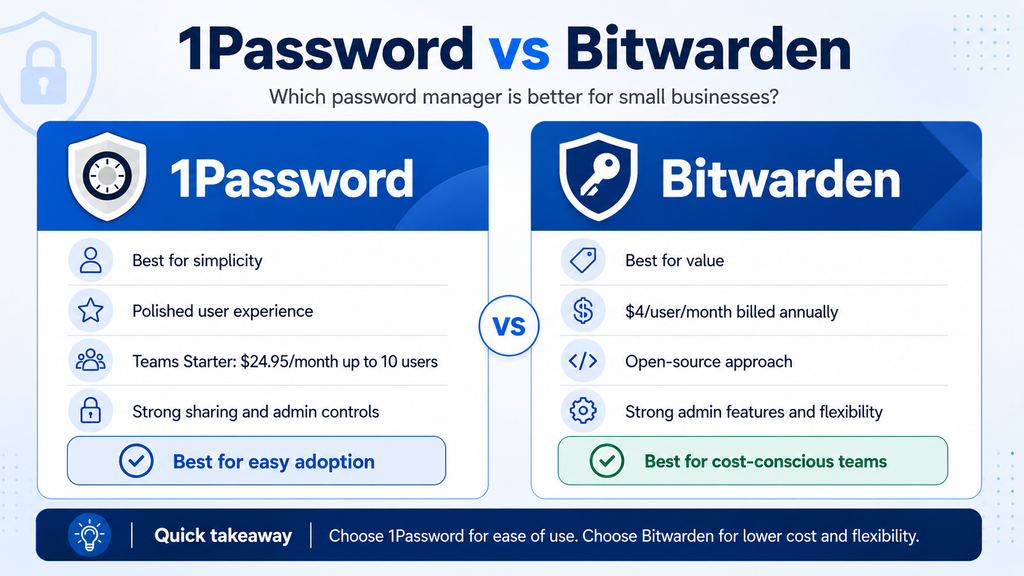
| Best for | Small teams prioritizing simplicity and ease of adoption | Cost-conscious and technically flexible teams |
| Entry business pricing | $24.95/month for up to 10 members, billed annually | $4/user/month, billed annually |
| Free trial | 14 days | Available |
| Secure team sharing | Yes | Yes |
| Administrative controls | Strong | Strong |
| Event/audit logs | Available depending on plan/features | Included with Teams |
| Directory/SCIM integration | Broader integrations on Business plan | Included with Teams |
| Open source | No | Yes |
| Self-hosting | No | Available with Enterprise |
| Strongest advantage | Polished user experience | Value and flexibility |
Pricing and plan features can change. Always check the providers’ current pricing and documentation before purchasing.
Pricing: Which Offers Better Value?
Pricing is one of the clearest differences between the two services.
1Password Pricing
1Password offers a Teams Starter Pack aimed at smaller organizations. It costs $24.95 per month when billed annually and includes up to 10 members. Additional seats can be added, while businesses needing more advanced identity integrations and administrative capabilities can move to the Business plan.
For a company with exactly 10 users, the Starter Pack works out to roughly $2.50 per user per month before considering additional seats. That can make it attractive for a small team that will use most or all of the included seats.
A very small business with only two or three employees, however, may find the fixed monthly price less appealing.
Bitwarden Pricing
Bitwarden Teams costs $4 per user per month when billed annually. Because pricing is based on the number of users, a business pays according to the size of its team rather than purchasing a fixed package.
For example, a three-person company would pay substantially less than a 10-person company under the per-user model.
Bitwarden’s Enterprise plan costs more but adds features aimed at organizations requiring greater control, including granular access management, passwordless SSO integration, account recovery, and self-hosting.
Pricing Verdict
For very small teams, Bitwarden can be the less expensive option because its pricing scales per user.
For teams approaching 10 members, 1Password’s Teams Starter Pack becomes more competitive, particularly if the business values its interface and ease of adoption.
Price alone should not determine the decision, but Bitwarden has the advantage for businesses where keeping software costs low is a major priority.
Ease of Use
Password managers only improve security when employees actually use them.
1Password
Ease of use is one of 1Password’s strongest qualities. Its applications are polished, navigation is generally straightforward, and common tasks such as saving passwords, generating credentials, accessing shared vaults, and using browser extensions are designed to require relatively little technical knowledge.
That can matter significantly for a small business without a dedicated IT department. If employees find a security tool confusing, they may return to insecure habits such as storing passwords in documents or reusing credentials.
1Password’s approach makes it particularly attractive for teams where simplicity and employee adoption are major priorities.
Bitwarden
Bitwarden is also straightforward to use, but its interface has historically emphasized function and flexibility more than visual polish.
For technically comfortable users, that is unlikely to be a problem. Administrators may actually appreciate the amount of control available.
For employees who are less comfortable with technology, however, 1Password may require slightly less explanation during onboarding.
Ease-of-Use Verdict
1Password has the advantage for ease of use and overall polish.
Bitwarden remains perfectly usable, but 1Password is likely to be the easier option for teams where employee adoption is a concern.
Security
Both products are built around protecting credentials, and either can represent a major improvement over password reuse, spreadsheets, or sending passwords through messaging applications.
1Password Security
1Password uses encrypted vaults for storing passwords and other sensitive information. Business features include role-based access, shared vault permissions, security alerts, and tools for monitoring password-related risks.
Its business controls also allow organizations to apply policies and restrict access according to employee responsibilities.
For small businesses, one of the practical benefits is being able to separate personal credentials from credentials shared across teams or departments.
Bitwarden Security
Bitwarden also uses end-to-end encryption and provides organizations with centralized ownership and management of business credentials.
The Teams plan includes secure credential sharing and event logs, giving administrators visibility into account activity. Bitwarden also provides additional controls at the Enterprise level.
Another point that distinguishes Bitwarden is its open-source approach, which may appeal to organizations that value transparency and the ability for security researchers to examine its software.
Security Verdict
For most small businesses, both provide strong security capabilities when configured and used properly.
I would not choose between them based solely on a claim that one is simply “more secure.” The more meaningful differences are likely to be administration, usability, deployment requirements, and the specific features your business needs.
Team Sharing and Administration
A business password manager should make it possible to share credentials without giving everyone unrestricted access.
1Password
1Password organizes shared information through vaults and permissions.
For example, a company could create separate vaults for:
- Management
- Finance
- Marketing
- Website administration
- Shared business services
Employees can then receive access according to their responsibilities.
Role-based permissions also help administrators control who can manage important settings and shared information.
Bitwarden
Bitwarden uses organizations and collections to manage shared credentials.
Its Teams plan includes centralized management, event logs, directory synchronization, and SCIM provisioning. These capabilities can be particularly useful as the number of employees grows and manual account administration becomes less practical.
Administration Verdict
Both products offer good team-management capabilities.
1Password may feel easier for smaller, less technical teams, while Bitwarden offers particularly strong administrative value at its Teams price point.
Integrations and Identity Management
Integrations become increasingly important as a business grows.
1Password
The Teams Starter Pack provides the core tools a smaller team is likely to need, while the Business tier expands integration capabilities.
1Password Business supports integrations with identity providers such as Microsoft Entra ID, Okta, OneLogin, and Duo, along with additional business controls.
For companies already using a centralized identity platform, these integrations can simplify employee access management.
Bitwarden
Bitwarden Teams includes directory synchronization and SCIM provisioning.
The Enterprise tier adds capabilities such as passwordless SSO integration and additional access controls.
Bitwarden also offers self-hosting at the Enterprise level, which can be valuable to organizations with specific infrastructure or data-control requirements.
Integration Verdict
For a typical small business using standard cloud applications, either product is likely to provide enough integration capability.
Organizations with more advanced requirements should compare the exact identity provider, SSO, directory, and provisioning features available on the plan they intend to purchase.
1Password Pros and Cons
What We Like
- Polished and approachable interface
- Strong shared-vault system
- Role-based permissions
- Useful security alerts
- Teams Starter Pack specifically designed for smaller teams
- Good onboarding experience
- Broad business integrations on higher plans
Potential Drawbacks
- Fixed Starter Pack price may be less economical for teams with only a few employees
- Some advanced business capabilities require the more expensive Business plan
- No self-hosting option
- Businesses focused primarily on low cost may find Bitwarden more attractive
Bitwarden Pros and Cons
What We Like
- Competitive per-user pricing
- Open-source approach
- Secure credential sharing
- Event and audit logs
- Directory synchronization
- SCIM provisioning included with Teams
- Strong administrative capabilities for the price
- Self-hosting available at the Enterprise level
Potential Drawbacks
- Interface may feel less polished to some users
- Certain advanced controls require Enterprise
- Less technical employees may require slightly more guidance during adoption
Which Is Better for a Very Small Business?
For a business with only a few employees, Bitwarden is particularly attractive from a pricing perspective.
Because Teams pricing is calculated per user, a three-person or four-person business does not have to pay for unused seats.
It can therefore be an excellent starting point for a small company that wants proper credential management while keeping recurring software costs under control.
However, if those employees are not particularly technical and ease of adoption is more important than minimizing cost, 1Password may still justify the additional expense.
Which Is Better for a Team of Around 10 People?
The calculation changes as the team approaches 10 members.
1Password’s Teams Starter Pack includes up to 10 users for a fixed $24.95 monthly price when billed annually. At that team size, the effective per-user cost becomes highly competitive.
For a 10-person business, 1Password therefore provides an attractive combination of pricing, usability, sharing, and administrative features.
Bitwarden remains a strong alternative, particularly for organizations that value its open-source model or administrative flexibility.
Which Is Better for Growing Businesses?
Growth changes what a company needs from a password manager.
A business that expects to add employees should consider:
- How new users are provisioned
- How departing employees are removed
- Whether directory synchronization is required
- Whether SSO will eventually be needed
- How permissions are managed
- How activity can be audited
- How pricing changes as the team grows
Bitwarden offers a strong path for businesses that prioritize administrative flexibility and transparent per-user pricing.
1Password Business becomes particularly attractive for companies that want broader identity-provider integrations while maintaining the familiar 1Password user experience.
1Password vs Bitwarden: Our Verdict
There is no universal winner because the better choice depends on what your business values most.
Choose 1Password if:
- You want a polished, easy-to-use interface
- Employee adoption is a major concern
- Your team is close to 10 users
- You prefer a straightforward shared-vault experience
- You are willing to pay somewhat more for usability and convenience
Choose Bitwarden if:
- Keeping costs low is important
- Your team is very small
- You value an open-source approach
- You want strong administrative features at a competitive price
- You may eventually want advanced deployment flexibility
For many small businesses, 1Password is the easier product to introduce to employees, while Bitwarden offers the stronger value proposition.
Neither choice eliminates the need for good security practices. Businesses should still enable multi-factor authentication, limit access to sensitive information, remove former employees promptly, and train staff to recognize phishing attempts.
Before You Choose
Start by considering how many employees will actually use the password manager and which administrative features your business genuinely needs.
A small team may care most about simple credential sharing and ease of use. A growing company may place greater importance on directory integration, provisioning, access policies, and audit capabilities.
Both 1Password and Bitwarden offer trial options, so testing each product with a few employees before making a long-term commitment can be more useful than choosing solely from a feature list.
For broader security guidance, visit our Cybersecurity section.
For more password-manager options, see our Best Password Managers for Small Businesses guide.
You can also browse our Reviews and Comparisons sections for more product research.
Pricing and product features referenced in this comparison were checked against official provider information. Software plans and features can change, so confirm current details directly with 1Password and Bitwarden before purchasing.