1Password Personal vs Business: What’s the Difference?
1Password Personal vs Business: Which Plan Is Right for You?
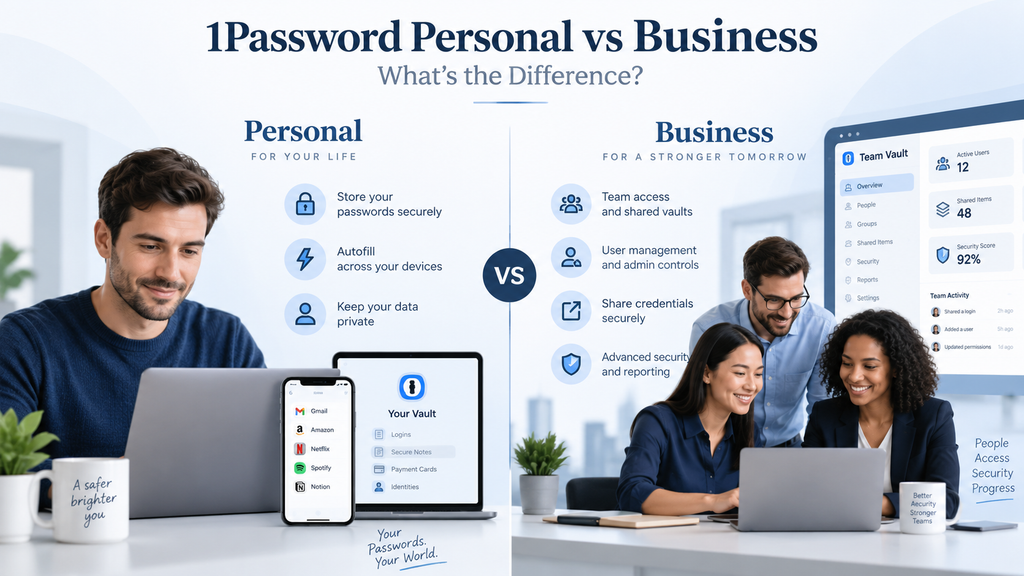
Choosing between 1Password Personal and Business depends on one simple question: are you protecting only your own passwords, or are you managing access for a team?
The personal plans are designed for individuals and families who need secure password storage, autofill, sharing, and alerts about weak or compromised credentials. Business plans add centralized administration, shared access controls, employee management, reporting, security policies, and other features designed for organizations. 1Password
For freelancers and very small businesses, the difference is not always obvious. Paying for a business plan may be unnecessary if only one person uses the account. But once multiple employees need access to company credentials, business-specific controls become much more important.
In this guide, we compare 1Password Personal vs Business so you can decide which option better fits your needs.
1Password Personal vs Business: Quick Comparison
| Feature | 1Password Individual | Teams Starter Pack | 1Password Business |
|---|---|---|---|
| Best for | One person | Small teams | Businesses needing advanced controls |
| Users | 1 | Up to 10 included | Per-user pricing |
| Annual-billing price | $2.99/month promotional price* | $24.95/month | $8.99/user/month |
| Password autofill | Yes | Yes | Yes |
| Secure item sharing | Yes | Yes | Yes |
| Shared business vaults | Limited personal sharing | Yes | Yes |
| Role-based permissions | No | Yes | Advanced |
| Security administration | Personal controls | Basic team controls | Advanced |
| Reports and insights | No | Limited | Yes |
| Audit log | No | Limited/not the main focus | Yes |
| Identity-provider integrations | No | No | Yes |
| Employee Families membership | No | No | Yes |
| Best choice for a company | Usually no | Small teams | Growing businesses |
*1Password currently lists the Individual plan at a promotional $2.99 per month with annual billing for eligible new customers, with a regular price of $3.99 per month. Pricing and promotions can change. 1Password
What Is 1Password Personal?
When people refer to “1Password Personal,” they usually mean 1Password’s plans for individuals and families.
The Individual plan is intended for one person. It lets you generate and store passwords, autofill credentials, use 1Password across supported devices, securely share individual items, and receive warnings about weak or compromised credentials. 1Password
There is also a Families plan for households that need multiple accounts and shared vaults.
For someone who works alone, the Individual plan may provide everything needed to protect personal and business logins.
A freelancer, consultant, or one-person business could use it to store:
- Website administrator credentials
- Banking logins
- Accounting software passwords
- Social media accounts
- Cloud storage credentials
- Email accounts
- Software license information
The important limitation is that an Individual account is not designed to centrally manage employees.
What Is 1Password Business?
1Password Business is designed for organizations rather than individual users.
Employees still get the familiar password manager experience, but administrators gain much more control over how company credentials are stored, shared, monitored, and removed.
1Password Business includes granular vault permissions, security and usage reports, Insights, security policies, an audit trail, custom groups and roles, automated provisioning, and support for single sign-on integrations with identity providers. 1Password
That changes 1Password from a personal password manager into a company-wide credential-management system.
For example, a business can create separate vaults for:
- Finance
- Marketing
- IT
- Management
- Human resources
- Client accounts
- Shared company services
Employees can then be given access only to the vaults they actually need.
The Biggest Difference: Centralized Management
The most important difference between 1Password Personal and Business is not password storage.
Both can securely store passwords.
The real difference is administration.
With a personal account, you control your own information.
With 1Password Business, administrators can manage access across an organization.
That includes controlling permissions, organizing people into groups, enforcing security policies, reviewing usage, and removing employee access when someone leaves the company. 1Password
For a business with several employees, those capabilities can be much more important than the basic password-manager functions.
1Password Individual Pricing
1Password currently lists its Individual plan at $2.99 per month with annual billing during its current new-customer promotion, with the regular annual-billing price shown as $3.99 per month.
The plan includes one seat.
The Families plan currently starts at a promotional $4.49 per month when billed annually, with a regular listed price of $5.99 per month, and includes up to five family members. 1Password
Because promotions can change, businesses should always check the current 1Password pricing page before subscribing.
1Password Teams Starter Pack Pricing
For a small company, the Teams Starter Pack may be more relevant than jumping directly to the full Business plan.
It currently costs $24.95 per month when paid annually and includes up to 10 members.
Businesses can add up to 10 additional seats at per-member pricing, allowing the plan to support up to 20 people. 1Password
The Teams Starter Pack includes features such as shared business credentials, security alerts, role-based permissions, developer tools, and onboarding support.
That can make it a practical middle ground for a small business that needs team password sharing but does not yet require advanced enterprise-style administration.
1Password Business Pricing
The full 1Password Business plan currently costs $8.99 per user per month when billed annually, or $107.88 per user per year. 1Password
It includes the capabilities of the Teams Starter Pack and adds more advanced business administration.
These include identity-provider integrations, broader permissions, stronger security-management tools, reporting, and other organizational controls. 1Password
This means the total cost increases with team size.
For example, a company with 10 employees would pay substantially more for Business than for the Teams Starter Pack, so the question becomes whether the additional administrative and security capabilities justify the extra cost.
1Password Personal vs Business Security Features
The Individual plan already provides strong password-management fundamentals.
It can generate strong passwords, autofill credentials, sync information across devices, and warn about weak or compromised credentials. 1Password
Business adds controls intended to protect an entire organization.
These include:
- Team security policies
- Granular vault permissions
- Security and usage reports
- Password-health insights
- Audit logging
- Custom user groups
- Automated user provisioning
- Identity-provider integrations
- Single sign-on options
Administrators can also enforce stronger account-password requirements, require two-factor authentication, and control access based on factors such as locations, IP addresses, and outdated applications. 1Password
For a company handling sensitive customer, financial, or operational credentials, these controls can be a significant advantage.
Shared Vaults and Employee Access
This is another area where the business plans are much stronger.
A small business should avoid having employees share passwords through email, messaging apps, spreadsheets, or handwritten notes.
With a business password manager, credentials can instead be placed inside shared vaults.
Administrators can determine which employees or groups can access those vaults and what they are allowed to do with the items inside them.
1Password Business provides 13 different vault permissions, covering actions such as viewing, editing, exporting, sharing, and accessing item history. 1Password
That allows a company to apply the principle of least privilege: employees receive access only to the information they actually need.
What Happens When an Employee Leaves?
This is one of the strongest reasons to choose a business password manager.
When an employee leaves, the business needs to make sure company credentials remain under company control.
1Password Business provides administrative tools for removing users, changing access, reviewing activity, and identifying credentials that may need to be changed. Its reports and audit capabilities are specifically designed to help organizations manage this kind of lifecycle. 1Password
With an Individual account, there is no equivalent centralized employee-management system.
Can You Keep Personal and Business Passwords Separate?
Yes, and this is generally the better approach.
1Password supports using multiple accounts in its apps, so someone can have a personal account and a work account at the same time.
1Password itself recommends keeping personal and work items in separate accounts so employees continue to have access to their personal information if they later leave an organization. 1Password
There is also an additional benefit for 1Password Business customers.
Employees using 1Password Business currently receive a free 1Password Families membership for personal use. 1Password
That allows work and personal credentials to remain separate while still being accessible through the same 1Password applications.
Which Is Better for Freelancers?
For a freelancer working alone, 1Password Individual will usually be sufficient.
There is little reason to pay for advanced organizational controls if there are no employees to manage.
An Individual account can protect logins for business tools, websites, banking accounts, email, cloud services, and client-related systems.
However, freelancers should still separate client credentials logically by using different vaults or organizational structures where appropriate.
Once contractors or employees regularly require access to shared company credentials, moving to a team plan becomes more attractive.
Which Is Better for a Two- or Three-Person Business?
This depends on how the business works.
If everyone operates independently and rarely shares credentials, personal accounts may appear cheaper.
But once employees regularly access the same business accounts, a proper team plan is usually the safer structure.
For a very small team, the Teams Starter Pack is worth comparing closely because its flat price includes up to 10 members. 1Password
That can make it more economical than purchasing the full Business plan when advanced administration is unnecessary.
Which Is Better for a Growing Small Business?
For businesses with multiple departments, changing staff, sensitive data, or formal security requirements, 1Password Business is the stronger option.
The biggest reasons are not simply password storage.
They are:
- Centralized employee management
- Granular permissions
- Security policies
- Reporting
- Audit trails
- Identity-provider integrations
- Automated provisioning
- Easier employee offboarding
These features become increasingly valuable as a company grows. 1Password
Do Small Businesses Really Need 1Password Business?
Not necessarily.
A one-person company probably does not.
A three-person business with limited credential sharing might be perfectly comfortable with the Teams Starter Pack.
But a business that employs more people, regularly hires and offboards staff, maintains different departments, or needs stronger oversight may benefit substantially from the full Business plan.
The decision should therefore be based on administrative needs, not simply company size.
Can You Upgrade from Personal to Business?
Yes.
1Password provides a migration process for moving existing work-related data into a team or business account.
The recommended approach is to add the new business account to your devices and then move work-related items from the existing personal or family account into appropriate business vaults. 1Password
Personal information can remain in a separate Individual or Families account.
This makes it possible to start with a personal subscription and move to a business structure later as the company grows.
1Password Personal vs Business: Which Should You Choose?
Here is the simplest way to decide.
Choose 1Password Individual if:
- You work alone.
- Only you need access to your business passwords.
- You do not need employee administration.
- You mainly want secure password storage, autofill, and breach alerts.
Choose Teams Starter Pack if:
- You have a small team.
- Multiple employees need shared credentials.
- You want role-based access without paying for the full Business plan.
- Your team is relatively straightforward to manage.
Choose 1Password Business if:
- You have a growing team.
- You need centralized employee administration.
- Different departments need different access.
- You want reporting and audit capabilities.
- You use an identity provider such as Microsoft Entra ID, Okta, or similar services.
- Employee onboarding and offboarding are regular activities.
Our Recommendation
For a solo entrepreneur or freelancer, 1Password Individual is generally the sensible choice.
You receive the core security features without paying for organizational capabilities you are unlikely to use.
For a small team, we would look first at the Teams Starter Pack. It gives businesses proper shared credential management and includes up to 10 members for a flat monthly price.
For a growing company that needs stronger security oversight, 1Password Business is the better long-term option.
Its advantage is not that it stores passwords more securely for an individual employee. Its advantage is giving the organization control over how business credentials are accessed, shared, monitored, and managed.
Frequently Asked Questions
Is 1Password Business more secure than Personal?
Both use 1Password’s underlying password-management security, but Business provides additional organizational security controls such as policies, permissions, reporting, audit logs, and administrative management.
For a company with multiple employees, those controls can reduce risks that a personal account cannot address. 1Password
Can I use 1Password Personal for my business?
Yes, particularly if you are a freelancer or sole proprietor.
The issue arises when several employees need to share and manage company credentials. At that point, using a business plan provides much better access management.
Does every employee need their own 1Password account?
With the business plans, employees are added as individual members rather than everyone using one shared master account. This makes it possible to assign permissions and remove individual access when necessary.
Does 1Password Business include a personal account?
1Password Business currently includes a free Families membership for each employee, allowing personal passwords to remain separate from company information. 1Password
Is the Teams Starter Pack the same as 1Password Business?
No.
Teams Starter Pack is designed for smaller teams and currently includes 10 members for a flat monthly price. Business uses per-user pricing and adds more advanced administration, reporting, identity-provider integrations, and security controls. 1Password
Can I move from 1Password Personal to Business later?
Yes. 1Password provides a migration process for moving work-related items into a team or Business account while keeping personal information separate. 1Password
Final Thoughts
The decision between 1Password Personal vs Business is less about which version has the better password manager and more about who needs to manage the passwords.
If you work alone, Individual is usually enough.
Once a team begins sharing company credentials, the Teams Starter Pack provides a more appropriate structure.
And when a business needs centralized administration, employee lifecycle management, reporting, permissions, and security policies, 1Password Business becomes much more valuable.
If you’re still comparing password-management options, these SecureBizTech resources can help:
- 1Password Review for Small Businesses — our broader look at 1Password for business use.
- 1Password vs Bitwarden for Small Businesses — compare 1Password directly with one of its strongest alternatives.
- Best Password Managers for Small Businesses — compare several password managers before deciding.
- How to Choose a Password Manager for a Small Business — practical criteria for evaluating password-management tools.
- Cybersecurity for Small Businesses — explore broader security guidance for protecting accounts, devices, and business data
