10 Cybersecurity Practices Every Small Business Should Follow
10 Cybersecurity Practices Every Small Business Should Follow
Small businesses are attractive targets for cybercriminals because they often depend heavily on technology while having fewer security resources than larger organizations. A phishing email, compromised password, ransomware infection, or lost device can interrupt operations and expose sensitive business or customer information.
Improving security does not necessarily require an expensive security department or complicated technology. Many of the most effective small business cybersecurity practices come down to consistent habits, sensible access controls, reliable backups, and choosing the right security tools.
The following steps can help reduce common risks and make your business better prepared when something goes wrong.
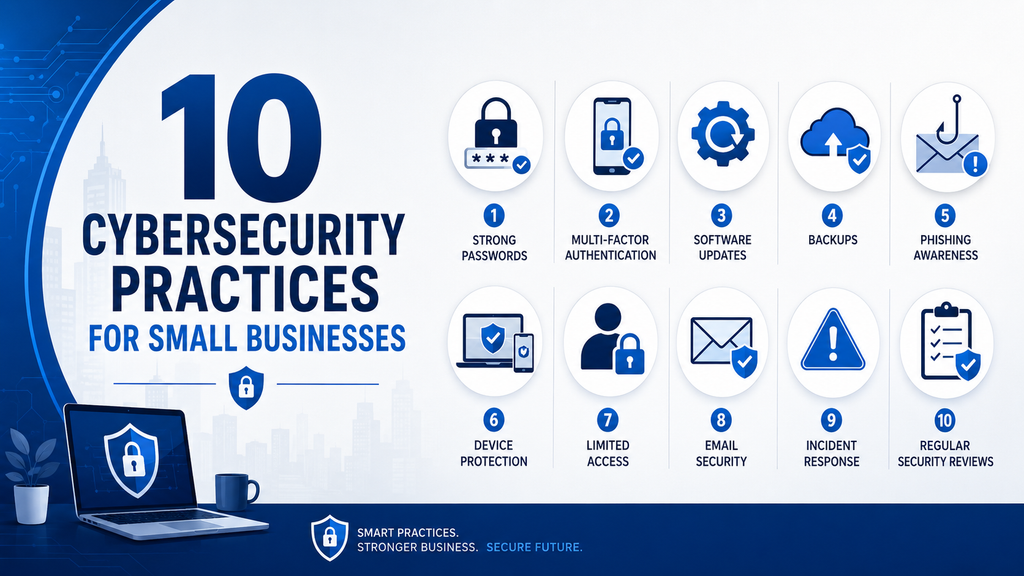
1. Use Strong, Unique Passwords
Reusing the same password across several accounts creates unnecessary risk. If one service is compromised, attackers may try the stolen password on email, cloud storage, banking, and other business systems.
Employees should use a different strong password for every important account. A reputable password manager can make this easier by generating and securely storing passwords so people do not have to remember them all.
Avoid sharing passwords through email, messaging apps, or documents that other people can easily access.
2. Enable Multi-Factor Authentication
Multi-factor authentication adds another verification step when someone signs in. This might involve an authenticator application, security key, or another approved method.
It is particularly important for:
- Business email
- Administrative accounts
- Cloud storage
- Financial services
- CRM and customer systems
- Website administration
Even when a password is stolen, multi-factor authentication can make it significantly harder for an attacker to gain access.
3. Keep Software and Devices Updated
Software updates often include fixes for security vulnerabilities discovered after a product was released. Delaying those updates can leave devices exposed to problems that attackers already know how to exploit.
Enable automatic updates where practical and regularly check:
- Operating systems
- Web browsers
- Business applications
- WordPress plugins and themes
- Routers and networking equipment
- Security software
Older software that no longer receives security updates should be replaced whenever possible.
4. Back Up Important Business Data
A reliable backup can make the difference between a temporary disruption and a serious business problem.
Back up information that would be difficult or expensive to replace, including customer records, financial documents, contracts, business files, and website data.
Do not rely on a single backup stored on the same computer or network as the original files. Keep at least one copy separate from your everyday systems and periodically test whether your backups can actually be restored.
5. Teach Employees to Recognize Phishing
Technical security tools are important, but employees also need to recognize suspicious activity.
Phishing messages may imitate banks, suppliers, colleagues, cloud services, or company executives. They often try to create urgency so the recipient clicks a link, opens an attachment, reveals a password, or sends money without checking the request carefully.
Encourage employees to verify unusual requests through another communication channel before taking action.
6. Protect Business Devices
Laptops, desktops, phones, and tablets can contain valuable business information and provide access to company systems.
Business devices should use:
- Screen locks
- Current security updates
- Endpoint protection where appropriate
- Device encryption
- Strong login credentials
- Remote lock or wipe capabilities where available
Employees should also avoid leaving business devices unattended in public locations.
7. Limit Access to Sensitive Information
Not every employee needs access to every system or file.
Give people access to the information and tools required for their responsibilities, and review those permissions periodically. Administrator privileges should be limited to users who genuinely need them.
When an employee or contractor leaves the business, disable their accounts promptly and remove access to company systems.
This reduces the damage that can occur if an account is compromised or misused.
8. Secure Your Business Email
Email remains one of the most common ways attackers reach businesses.
Use a reputable email provider with spam filtering and security protections. Enable multi-factor authentication and teach employees to be cautious with unexpected attachments, unfamiliar links, and requests involving passwords or payments.
For important financial requests, establish a verification process rather than relying only on an email message.
9. Prepare for a Security Incident
No security system can guarantee that an incident will never happen. A basic response plan can help your business act more quickly if an account is compromised, a device is infected, or sensitive information is exposed.
Your plan should identify:
- Who should be contacted
- Which systems may need to be disconnected
- Where backups are stored
- How passwords will be reset
- Who is responsible for communicating with customers or partners
- Which external specialists may be needed
Keep the plan somewhere accessible even if your normal computer systems are unavailable.
10. Review Your Security Regularly
Cybersecurity is not a one-time project.
Businesses change, employees come and go, new software is introduced, and attackers develop new techniques. Set aside time periodically to review accounts, software, backups, device security, employee access, and important security settings.
Small improvements made consistently are usually more useful than creating a complicated security plan that nobody maintains.
Building Better Cybersecurity Habits
Good cybersecurity is built through layers. Strong passwords alone are not enough, and neither is security software. Combining safer account practices, updates, backups, employee awareness, access control, and a basic incident plan give a small business much stronger protection.
Start with the areas where your business is currently weakest and improve them gradually. The goal is not perfect security; it is reducing unnecessary risk and making your business harder to disrupt.
For more practical guidance, explore our Cybersecurity section and Small Business Technology Guides.
For additional guidance, the NIST Small Business Cybersecurity Corner provides practical resources for smaller organizations.
