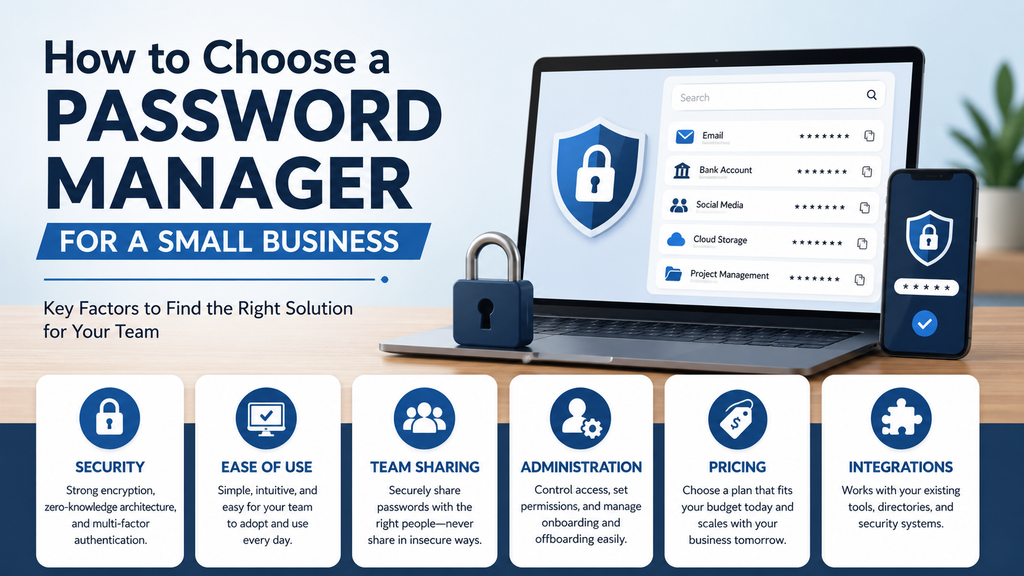
How to Choose a Password Manager for a Small Business
How to Choose a Password Manager for a Small Business
Choosing a password manager for a business is different from choosing one for personal use. A small company may need several employees to access shared accounts, control who can see sensitive credentials, remove access when someone leaves, and keep important business passwords organized in one secure place.
The challenge is that password managers can look very similar at first. Most promise strong encryption, password generation, autofill, and cross-device access. The important differences often appear in team sharing, administration, pricing, integrations, security policies, and how easy the product is for employees to use.
If you are trying to choose a password manager for a small business, the goal should not be to find the product with the longest feature list. Instead, look for a solution that fits your team size, security requirements, budget, and everyday workflow.
This guide explains the most important factors to consider before making a decision.
Start With Your Business Needs
Before comparing individual products, identify the problem you are trying to solve.
For many small businesses, the need for a password manager begins when employees start sharing access to company accounts.
These may include:
- Business email
- Accounting software
- Cloud storage
- Website administration
- Social media
- Customer relationship management systems
- Marketing platforms
- Online banking or financial services
- Project management tools
- Other business applications
If passwords are being stored in spreadsheets, browser notes, documents, or messaging applications, moving to a business password manager can provide a more controlled way to manage access.
However, different businesses will need different levels of administration.
A three-person company may only need secure password storage and sharing, while a 30-person organization may also need directory synchronization, detailed activity logs, automated provisioning, and stronger access policies.
1. Look for Strong Security
Security should be one of the first factors you evaluate.
A password manager stores access to some of your company’s most important systems, so the way that information is protected matters.
End-to-End Encryption
Look for a password manager that uses strong encryption and protects vault information before it is transmitted or stored.
A well-designed service should prevent the provider from simply reading the passwords stored inside customer vaults.
Zero-Knowledge Architecture
Many major password managers describe their systems as using a zero-knowledge design.
In practical terms, this means the provider is designed not to know the information stored inside your encrypted vault.
When comparing products, read the provider’s security documentation rather than relying only on marketing claims.
Multi-Factor Authentication
The password manager itself should support multi-factor authentication.
This adds another layer of protection if an employee’s master password or account credentials are compromised.
For important business accounts, multi-factor authentication should also be enabled wherever the underlying service supports it.
2. Consider Ease of Use
A password manager can offer excellent technical security and still fail if employees find it difficult to use.
This is especially important for small businesses without dedicated IT staff.
Employees should be able to perform common tasks without extensive training, including:
- Saving passwords
- Generating strong passwords
- Autofilling login information
- Accessing shared credentials
- Finding the correct vault or collection
- Using the password manager on different devices
A complicated interface may encourage employees to return to old habits such as storing passwords in documents or reusing simple credentials.
Test the Product With Real Employees
Rather than evaluating a password manager only from screenshots or feature lists, use the trial period if one is available.
Ask a few employees to test everyday tasks.
Can they save a login?
Can they access a shared password?
Can they use the browser extension without confusion?
Can they understand which credentials belong to them and which belong to the company?
These practical questions may reveal more than a long comparison of technical specifications.
3. Check Team Sharing Features
Secure password sharing is one of the biggest reasons to use a business password manager.
Employees often need access to shared accounts, but everyone should not necessarily have access to everything.
A good business password manager should allow administrators to organize credentials into groups, vaults, collections, or similar structures.
For example, a company might create separate areas for:
- Finance
- Marketing
- Management
- Website administration
- Social media
- Customer support
- Shared business services
Employees can then receive access only to the credentials required for their responsibilities.
This is much safer than sharing the same password through email, chat, or a spreadsheet.
4. Review Access Controls
As a business grows, access management becomes increasingly important.
A password manager should make it possible to control who can view, use, edit, or manage shared information.
This supports the principle of least privilege: employees should have access only to the systems they genuinely need.
For example, someone responsible for marketing may need social media credentials but should not automatically receive access to accounting or administrative systems.
Look for features such as:
- Role-based permissions
- Group-based access
- Vault or collection permissions
- Administrative roles
- Ability to revoke access quickly
- Policies for sensitive credentials
These controls can reduce unnecessary exposure if an employee account is compromised.
5. Think About Employee Onboarding and Offboarding
One of the most overlooked benefits of a business password manager is easier employee access management.
When Someone Joins
A new employee can be added to the business account and given access to the appropriate shared credentials.
This is more organized than sending passwords one at a time.
When Someone Leaves
When an employee leaves the company, their access should be removed promptly.
Important business credentials should remain under company control rather than being stored only in the employee’s personal browser, notes, or personal password manager.
For a very small business, this process may be handled manually.
Larger or growing businesses should consider whether they will eventually need automated provisioning or directory synchronization.
6. Check Activity Logs and Administrative Visibility
Activity logs can help administrators understand what is happening inside the business account.
Depending on the password manager and subscription plan, logs may show events such as:
- User invitations
- Account changes
- Changes to organizational access
- Administrative actions
- Changes to shared credentials
- Security-related events
Small businesses may not use these logs every day, but they can become useful when investigating a problem or reviewing access.
If auditability is important to your business, compare exactly what each provider records and how long that information remains available.
7. Compare Pricing Based on Your Team Size
The lowest advertised price is not always the least expensive option for your business.
Password managers use different pricing models.
Some charge per employee, while others offer fixed packages for smaller teams.
For example, a per-user plan may be attractive for a company with only three employees.
A fixed package covering up to 10 employees may become more competitive when the team is closer to that limit.
When comparing costs, consider:
- Price per user
- Minimum number of seats
- Monthly versus annual billing
- Features included in the entry business plan
- Cost of additional users
- Whether important features require a higher plan
- How pricing will change as your team grows
Also consider the cost of switching later if your business outgrows the original plan.
8. Check Cross-Device Support
Employees may need to access business accounts from different devices.
A password manager should ideally work across the platforms your team already uses, such as:
- Windows
- macOS
- Linux
- Android
- iPhone and iPad
- Chrome
- Edge
- Firefox
- Safari
Browser extensions are particularly important because employees will often interact with the password manager while signing into web applications.
Before choosing a service, confirm that it works well across your actual business devices rather than assuming every platform has identical support.
9. Consider Integrations
Very small companies may not need many integrations.
As a business grows, however, integration with existing identity and directory systems can make administration much easier.
Depending on your environment, you may eventually want compatibility with services such as:
- Microsoft Entra ID
- Okta
- Google Workspace
- OneLogin
- Duo
- Other identity providers
Features such as directory synchronization and SCIM provisioning can automate some employee-management tasks.
These capabilities are unlikely to be essential for a three-person business, but they can become valuable as the number of employees increases.
10. Look for Password and Security Monitoring
Some password managers provide tools that help identify risky credentials.
These may include warnings for:
- Weak passwords
- Reused passwords
- Compromised passwords
- Exposed credentials
- Insecure websites
- Accounts without multi-factor authentication
These features can help employees improve security rather than simply storing passwords.
However, security monitoring should support good security habits, not replace them.
Employees still need training, sensible access controls, and clear security procedures.
11. Consider Passkey Support
Passkeys are becoming more widely supported as an alternative to traditional passwords.
Rather than relying on a password that can be typed, reused, or phished, passkeys use cryptographic authentication tied to the user’s device and account.
A business password manager that supports both traditional passwords and passkeys may be better prepared for the gradual shift toward passwordless authentication.
You should not choose a password manager based entirely on passkeys today, but it is worth considering how well the product supports newer authentication methods.
12. Decide Whether Open Source Matters to You
Some password managers make their source code publicly available, while others use proprietary software.
Open-source software can provide additional transparency because developers and security researchers can examine the code.
Bitwarden is a well-known example of an open-source password manager.
However, open source alone does not guarantee security.
A business should also consider:
- Security architecture
- Independent audits
- Vulnerability management
- Encryption methods
- Update practices
- Provider reputation
- Administrative controls
For some businesses, open-source transparency will be important. For others, ease of use or integration capabilities may matter more.
13. Decide Whether You Need Self-Hosting
Most small businesses should use a reputable provider’s hosted password-management service.
Self-hosting places additional responsibility on the business for:
- Server maintenance
- Updates
- Security
- Backups
- Availability
- Monitoring
- Disaster recovery
Unless your company has the technical resources and a specific reason to operate its own infrastructure, cloud hosting is usually the simpler option.
Self-hosting may still matter for organizations with specialized technical, security, or regulatory requirements.
Questions to Ask Before Choosing
Before subscribing, ask yourself:
- How many employees need access?
- Which accounts are currently being shared?
- Do employees need separate shared vaults or groups?
- How easy will the service be for non-technical staff?
- Does it support multi-factor authentication?
- Can administrators quickly remove access?
- Are activity logs available?
- Does it work across our existing devices?
- Will we need directory synchronization later?
- Does the pricing still make sense if the company grows?
- Are important features locked behind a more expensive plan?
Answering these questions can narrow the options considerably.
1Password or Bitwarden?
For many small businesses, 1Password and Bitwarden are two of the strongest options worth considering.
Consider 1Password If
1Password may be a better fit if you prioritize:
- Ease of use
- A polished interface
- Employee adoption
- Straightforward shared vaults
- A fixed package for a team approaching 10 users
Read our 1Password Review for Small Businesses for a detailed look at its features, strengths, and limitations.
Consider Bitwarden If
Bitwarden may be a better fit if you prioritize:
- Lower per-user costs
- Open-source transparency
- Flexible administration
- Directory synchronization
- SCIM provisioning
- A strong feature set for growing teams
Read our Bitwarden Review for Small Businesses for a closer look.
For a direct side-by-side comparison, see our 1Password vs Bitwarden for Small Businesses guide.
Do You Actually Need a Business Password Manager?
If you run a one-person business and never share credentials, a personal password manager may provide much of what you need.
The situation changes when employees, contractors, or partners begin sharing access to business systems.
At that point, business features such as centralized ownership, shared vaults, permissions, employee removal, and administrative controls become increasingly useful.
If several people currently share passwords through spreadsheets, messages, or documents, adopting a business password manager should be a serious consideration.
Common Mistakes to Avoid
Choosing Only by Price
The cheapest service is not always the best value.
A slightly more expensive product may be worthwhile if employees find it substantially easier to use.
Giving Everyone Access to Everything
Password managers make sharing easier, but that does not mean every employee should have access to every account.
Use separate groups or vaults and limit access according to job responsibilities.
Ignoring Multi-Factor Authentication
Protecting dozens of credentials inside one vault makes the password-manager account especially important.
Enable multi-factor authentication and encourage strong authentication practices.
Forgetting About Former Employees
Remove access as soon as an employee or contractor no longer needs it.
Never Reviewing Access
Permissions that made sense a year ago may no longer be appropriate.
Review access periodically, particularly when employees change roles.
Our Recommendation
When you choose a password manager for a small business, begin with your actual workflow rather than a product’s marketing page.
For most small businesses, the most important factors are:
- Strong security
- Ease of use
- Secure team sharing
- Access controls
- Reasonable pricing
- Simple onboarding and offboarding
- Compatibility with existing devices
- Enough administrative capability to support future growth
A technically powerful password manager is not necessarily the best choice if employees struggle to use it.
Likewise, choosing solely on price may create problems later if the service lacks the controls your business needs as it grows.
Use free trials where available, involve a few employees in the evaluation, and test real tasks before committing to a long-term subscription.
Strengthen Your Password Security
Choosing the right password manager is an important step, but it should be part of a broader cybersecurity strategy.
Businesses should also enable multi-factor authentication, keep software updated, maintain reliable backups, restrict unnecessary access, and train employees to recognize phishing attempts.
If this guide helped you understand how to choose a password manager for a small business, visit our Cybersecurity section and our Small Business Technology Guides for more practical security advice.
You can also explore our Best Password Managers for Small Businesses guide to compare recommended options.
