1Password Review for Small Businesses: The Ultimate Guide to Secure Team Password Management
1Password Review for Small Businesses
Managing passwords becomes more difficult as a small business adds employees, software, cloud services, and shared accounts. Teams may need access to email, accounting platforms, customer systems, social media, website administration, cloud storage, and many other services.
Without a proper system, employees may reuse passwords, store them in spreadsheets, or share credentials through email and messaging apps. These habits can create unnecessary security risks.
1Password gives businesses a more organized way to create, store, and share credentials. It combines encrypted password storage with shared vaults, access controls, security alerts, administrative features, and integrations for growing organizations.
In this 1Password review for small businesses, we look at pricing, ease of use, security, team sharing, business features, strengths, limitations, and the types of companies that are likely to get the most value from it.
Quick Verdict
1Password is a strong choice for small businesses that prioritize ease of use, employee adoption, and straightforward team password sharing.
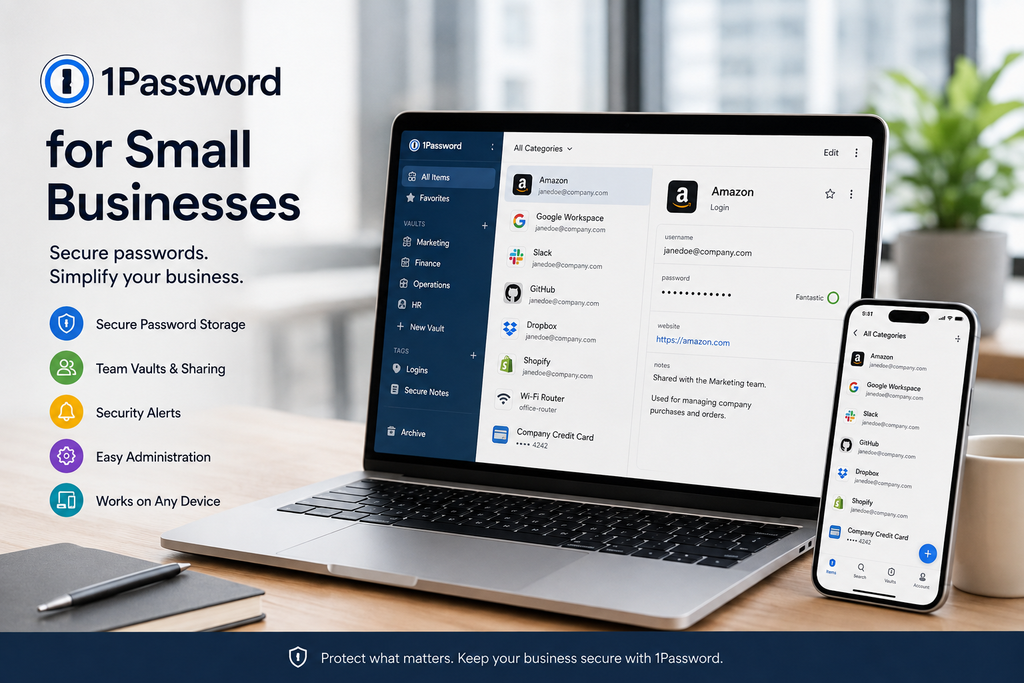
Its biggest strength is the balance between security and usability. Employees can save, generate, autofill, and share credentials without needing extensive technical knowledge, while administrators can control access to shared vaults and manage team members.
The Teams Starter Pack is particularly attractive for businesses with up to 10 users because it provides a fixed-price package designed specifically for smaller teams.
Its main limitation is pricing for very small businesses. A company with only two or three employees may find a lower-cost per-user alternative more economical.
Best For
1Password is particularly well suited to:
- Small teams that want an easy-to-use password manager
- Businesses with several shared accounts
- Companies without a dedicated IT department
- Teams that want simple access controls
- Businesses approaching 10 employees
- Organizations that may later need more advanced identity integrations
1Password Pricing for Small Businesses
1Password offers two main business options that are relevant to small and growing companies: the Teams Starter Pack and 1Password Business.
Teams Starter Pack
The Teams Starter Pack costs $24.95 per month when billed annually and includes up to 10 members.
It provides the core features most small teams need, including:
- Secure password and sensitive-data sharing
- Shared vaults
- Role-based permissions
- Security alerts
- Administrative controls
- Support and onboarding resources
- Up to 10 included members
For a company with close to 10 employees, the pricing can be attractive because the fixed monthly cost is spread across the entire team.
1Password Business
1Password Business costs more but provides additional administrative and identity-management capabilities.
It is designed for organizations that need more advanced controls, broader integrations, and more centralized user management.
The Business plan supports integrations with identity providers such as Microsoft Entra ID, Okta, OneLogin, and Duo.
Pricing Verdict
For a team of around 8 to 10 employees, the Teams Starter Pack can offer strong value.
For a very small company with only two or three employees, however, the fixed monthly price may be less attractive than a competitor that charges strictly per user.
Businesses that need advanced identity integrations or broader administrative controls should compare the Business plan rather than relying only on the Starter Pack.
Pricing and plan features can change, so always confirm the latest information directly with 1Password before purchasing.
Ease of Use
Ease of use is one of 1Password’s strongest advantages.
Employees can use 1Password through desktop applications, mobile apps, browser extensions, and supported operating systems.
Common tasks are relatively straightforward:
- Saving login credentials
- Generating strong passwords
- Autofilling usernames and passwords
- Sharing credentials through vaults
- Accessing passwords across devices
- Creating and using passkeys
- Organizing sensitive information
This simplicity matters because a security tool only provides value when employees actually use it.
If a password manager feels complicated, some employees may return to insecure habits such as reusing passwords or storing credentials in documents.
Ease-of-Use Verdict
1Password is one of the stronger options for teams that want a polished and approachable password manager.
Businesses with non-technical employees may especially appreciate its straightforward interface and familiar browser-based workflow.
Security
1Password is built around encrypted password storage, authentication controls, and secure sharing.
One of the features that distinguishes it from many competitors is the use of a Secret Key alongside the user’s account password.
Secret Key
The Secret Key is generated when a 1Password account is created and works together with the user’s account password.
This provides an additional layer of protection because access to the vault depends on more than the account password alone.
For businesses, this can strengthen protection against attacks that target user credentials.
Two-Factor Authentication
1Password supports two-factor authentication and provides administrative controls that can help businesses strengthen login security.
Administrators can also manage access policies and permissions according to the needs of the organization.
Security Alerts
1Password includes security tools that can help users identify weak, reused, or compromised passwords.
These alerts can encourage employees to update risky credentials before they become a larger security problem.
Security Verdict
For most small businesses, 1Password provides a strong security foundation.
However, using a password manager should be part of a broader security strategy.
Businesses should still use multi-factor authentication, limit unnecessary access, remove former employees promptly, keep software updated, and train staff to recognize phishing attempts.
Team Sharing and Vaults
One of the most useful 1Password features for businesses is the ability to organize credentials into shared vaults.
A vault can contain passwords and other sensitive information that should only be accessible to certain employees.
For example, a business could create separate vaults for:
- Management
- Finance
- Marketing
- Website administration
- Social media
- Customer systems
- Shared business services
Employees can then be given access only to the vaults they need.
This is much safer than sending passwords through email or messaging apps.
Role-Based Permissions
1Password provides role-based permissions that help administrators control who can access and manage shared information.
For example, a marketing employee may need access to social media credentials but should not automatically receive access to financial systems.
This makes it easier to follow the principle of least privilege, where employees receive only the access required for their work.
Secure Sharing
1Password also allows users to share selected information securely without simply copying passwords into email or chat messages.
This can be useful when a credential needs to be shared temporarily with a contractor, consultant, or other trusted person.
Employee Onboarding and Offboarding
Employee access becomes more important as a business grows.
When a new employee joins, administrators can invite them to the company account and provide access to the appropriate vaults.
When an employee leaves, administrators can remove their access while keeping company-owned credentials inside the business account.
This provides an important advantage over situations where passwords are stored only in an employee’s personal browser, private notes, or personal password manager.
Centralized ownership makes it easier to maintain control of important business accounts.
Business Integrations
The Teams Starter Pack provides the core tools most smaller businesses are likely to need.
Companies requiring more advanced identity management can move to 1Password Business.
The Business plan supports integrations with services such as:
- Microsoft Entra ID
- Okta
- OneLogin
- Duo
These integrations can make user management easier for businesses already using centralized identity systems.
Why This Matters
A five-person company may not need advanced identity integration today.
As the company grows, however, manually managing every employee account can become inefficient.
Centralized identity management can make onboarding, access changes, and offboarding more consistent.
Passkeys and Passwordless Login
1Password also supports passkeys.
Passkeys are designed to replace traditional passwords on services that support them and can reduce exposure to some password-based attacks.
As more websites and applications adopt passwordless authentication, passkey support is becoming increasingly useful.
Small businesses may still need traditional passwords for many services, so a password manager that supports both passwords and passkeys can provide a smoother transition.
1Password Pros and Cons
What We Like
- Polished and easy-to-use interface
- Strong team password sharing
- Shared vaults and permissions
- Useful security alerts
- Support for passkeys
- Cross-platform applications
- Browser extensions
- Good onboarding experience
- Teams Starter Pack designed for smaller businesses
- Identity-provider integrations available on Business
- Strong administrative features for growing companies
Potential Drawbacks
- Fixed Starter Pack price may be expensive for teams with only two or three users
- Some advanced administrative features require the Business plan
- Business pricing can be higher than lower-cost competitors
- No self-hosted deployment option
- Highly technical teams may prefer more flexible alternatives
Who 1Password Is Best For
1Password is particularly strong for businesses that value simplicity and employee adoption.
Small Teams Without Dedicated IT Staff
The interface and onboarding process make 1Password suitable for companies where the owner, office manager, or another employee handles basic technology administration.
Employees do not need to understand complex security concepts before they can start saving and sharing passwords more safely.
Teams With Many Shared Accounts
Businesses that regularly share credentials for social media, websites, marketing tools, subscriptions, or administrative systems can benefit from shared vaults.
Instead of sending passwords between employees, access can be managed centrally.
Teams Approaching 10 Employees
The Teams Starter Pack becomes particularly attractive when a company uses most of the included seats.
For a team close to 10 people, the effective cost per user can become competitive compared with per-user alternatives.
Growing Businesses
Companies that expect to grow can move to 1Password Business if they later need more advanced identity integrations and administrative controls.
Who Should Consider an Alternative
1Password will not be the best option for every business.
Very Small Teams Focused on Cost
A company with only two or three employees may prefer a per-user product such as Bitwarden Teams.
For very small teams, per-user pricing may result in a lower monthly cost.
Businesses That Prefer Open-Source Software
1Password is not open source.
Businesses that specifically prefer an open-source password manager may find Bitwarden more appealing.
Organizations Requiring Self-Hosting
Businesses with strict infrastructure or self-hosting requirements may need to consider other products.
For most small businesses this will not matter, but it can be important for organizations with specialized technical or compliance needs.
1Password vs Bitwarden
Bitwarden is one of the most common alternatives to 1Password.
Both products can help businesses store, organize, and share passwords securely, but their strengths are slightly different.
1Password’s biggest advantage is usually ease of use. Its interface is polished and it is particularly well suited to teams that want a straightforward onboarding experience.
Bitwarden’s biggest advantage is value and flexibility. Its per-user pricing can be more attractive for very small teams, while its open-source approach appeals to organizations that value transparency.
For a detailed comparison, read our 1Password vs Bitwarden for Small Businesses article.
You can also read our Bitwarden Review for Small Businesses for a closer look at Bitwarden’s strengths and limitations.
Is 1Password Worth It for a Small Business?
For many small businesses, yes.
1Password solves a real problem: employees need access to many accounts, but storing and sharing passwords insecurely creates unnecessary risk.
The Teams Starter Pack provides a practical combination of secure password storage, shared vaults, access controls, security alerts, and ease of use.
Its biggest advantage is not simply the number of features it offers.
It is the fact that those features are relatively easy for employees to use consistently.
A cheaper password manager may not provide better value if employees find it difficult to use and return to insecure password habits.
Final Verdict
1Password is one of the strongest password managers for small businesses that prioritize usability, secure team sharing, and straightforward administration.
The Teams Starter Pack is particularly appealing for companies with several employees and becomes increasingly competitive as the team approaches 10 members.
Its polished interface and simple vault structure can make it easier for employees to adopt better password habits without extensive training.
The main disadvantage is cost for very small teams. Businesses with only a few employees may find Bitwarden or another per-user alternative less expensive.
Our Recommendation
Choose 1Password if your business values ease of use, employee adoption, secure sharing, and a polished experience.
Consider Bitwarden if your highest priorities are lower per-user cost, open-source transparency, or greater technical flexibility.
Before purchasing, use the available trial period and test 1Password with a few employees. The most important question is whether your team can use it comfortably and consistently.
If you found this 1Password review for small businesses useful, visit our Cybersecurity section and our Small Business Technology Guides.
You can also read our Best Password Managers for Small Businesses guide to compare additional options.
Pricing and product features in this review were checked against official 1Password information. Plans, features, and pricing can change, so confirm current details directly with 1Password before purchasing.
